



 159
159
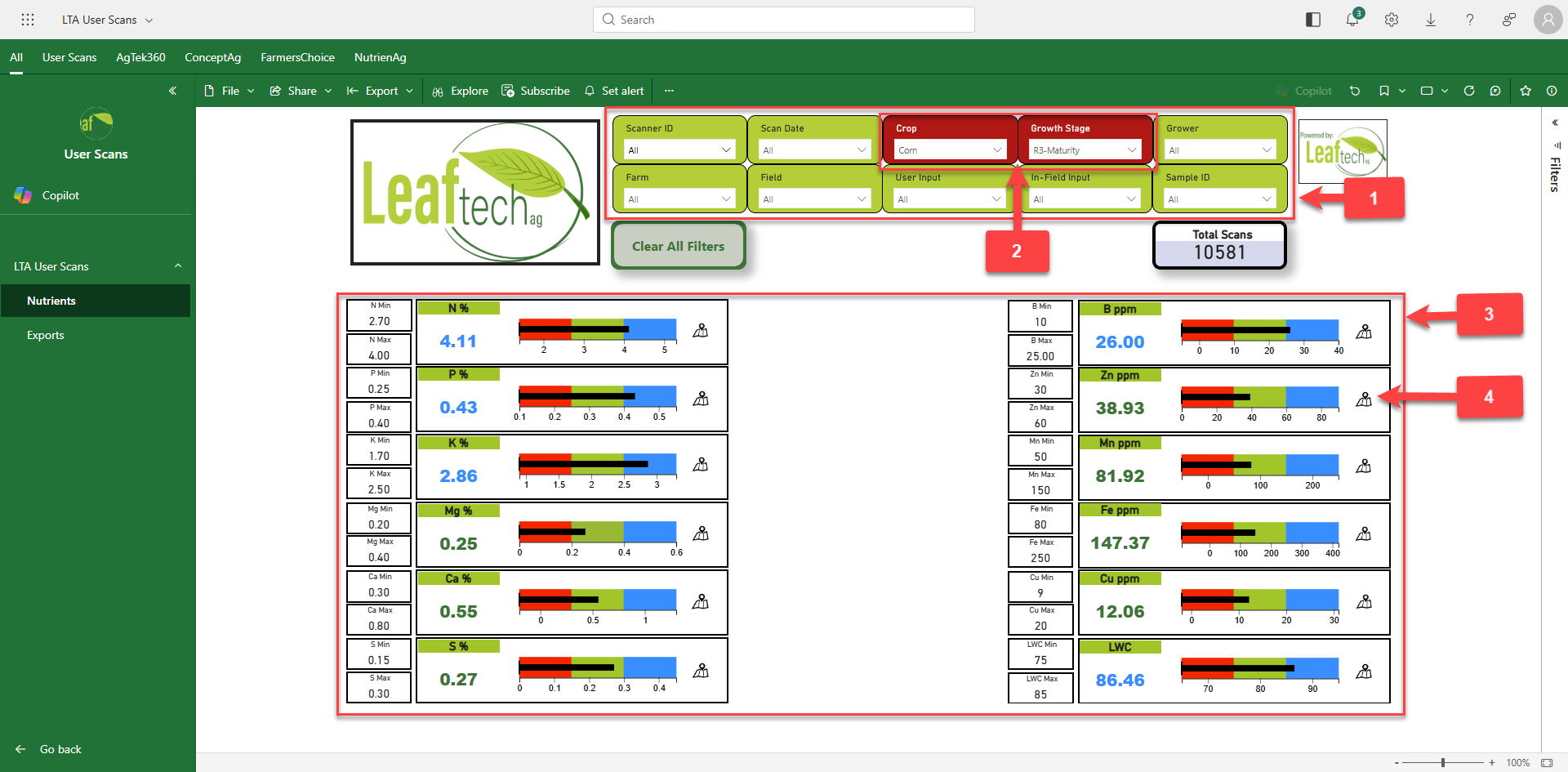
1 - Filters are applied to focus in on the farm, field, grower, date that is relevant for what you are trying to view.
- Note: The Filters are generated from the inputs that are selected during a sampling session in the Leaftech Ag app.
2 - Crop and Growth Stage are required so that the correct sufficiency table can be applied.
3 - Nutrient Readings
- Macronutrients are displayed in Percent.
- Micronutrients are displayed in Parts Per Million.
- Nutrient Levels are shown on bar graphs.
- Red - Nutrient is insufficient for Crop and Growth Stage
- Green - Nutrient is sufficient for Crop and Growth Stage.
- Blue - Nutrient is more than sufficient for the crop and Growth Stage.
- Note: The colors do not show for the crop types of "Other" and "Select Crop." Please also note that the green/sufficient band can be adjusted for your user account. Please contact us at [email protected] for more information.
4 - Map View
- Clicking on this icon opens a map of that nutrient. Hovering over each pin drop shows the value for that scanned point along with latitude, longitude, and sample ID.

